
Nursery billing and funding, sorted.

The billing system built for school nurseries. Funded hours on every invoice, parents paying on time, and a funding claim that’s ready for audit.

  • UK hosted
  • Microsoft 365 sign-in
  • Built by Insight IT, a UK schools IT company
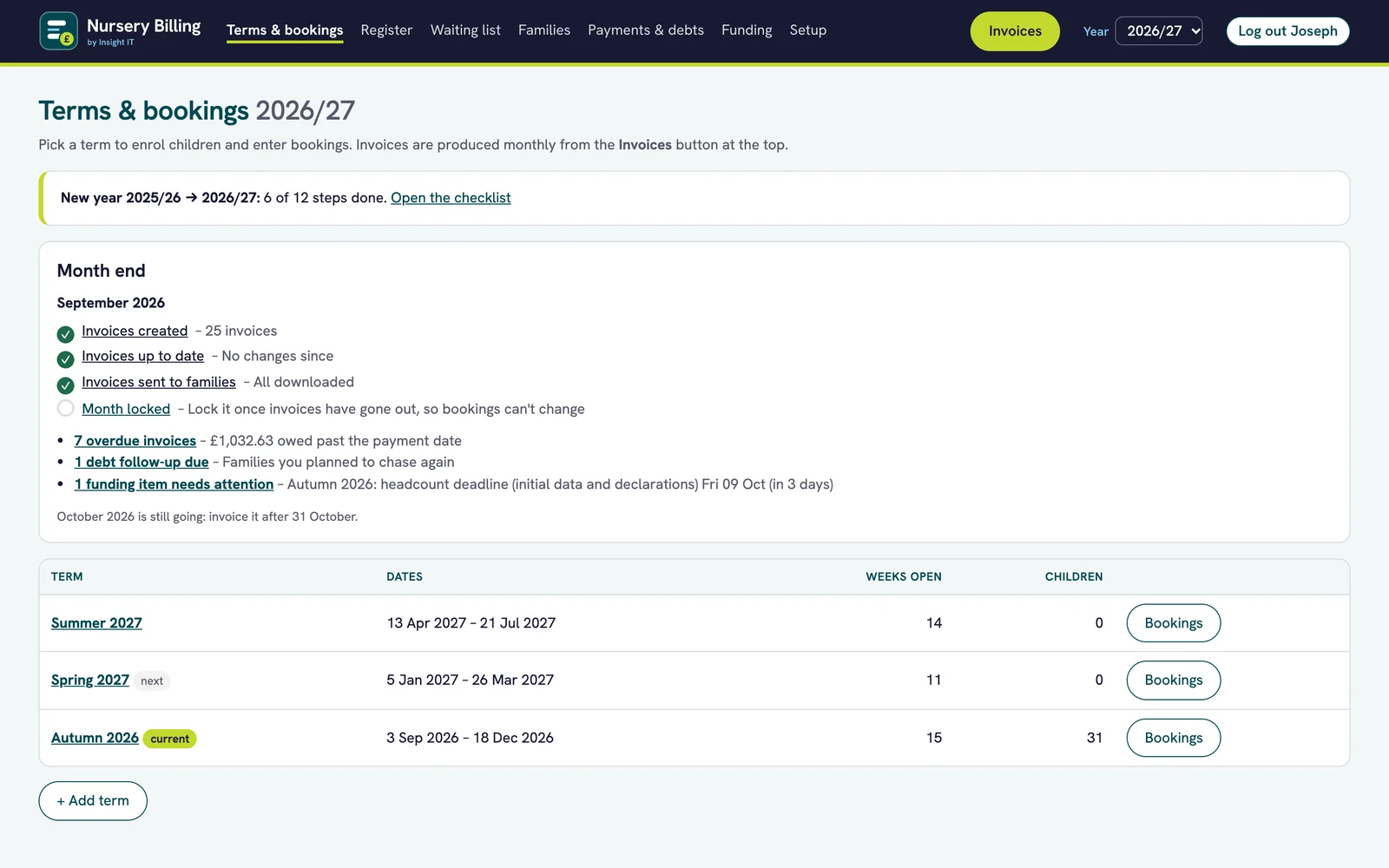
Nursery Billing dashboard showing the month-end checklist with three of four steps done, the list of terms and a new-year card.
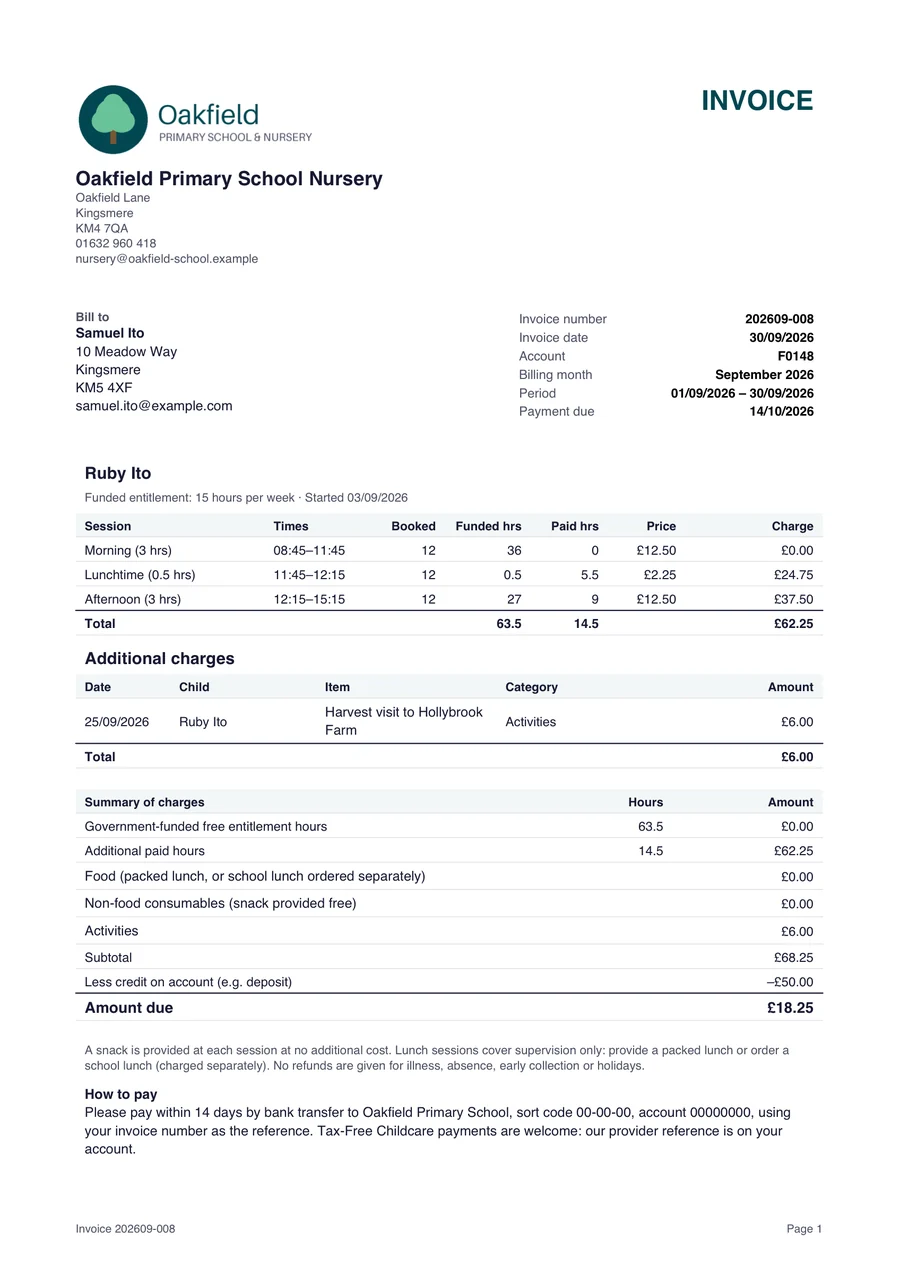
An itemised monthly invoice showing funded hours at no charge, paid sessions, a trip charge and a deposit taken off.

Nursery billing shouldn’t take days

Most nursery software is built for private nurseries and sold per child, full of learning journals and parent apps a school doesn’t need. School offices need help with something else.

Spreadsheets that break every month

Funded hours, top-ups, lunches and extra sessions, all worked out by hand and checked twice.

Money that slips through

Unpaid invoices that nobody has time to chase, and parents querying bills you can’t easily explain.

Funding paperwork that keeps you up at night

30-hours codes, declarations, the termly headcount and the worry of a council audit.

How it works

Nursery Billing does the part school offices struggle with: billing funded hours correctly, getting paid, and keeping the early years funding claim audit-ready.

  1. Once a term

    Set up each child’s week

    Add their usual sessions and funded hours. Bookings fill themselves in for the whole term.

  2. Every month

    Click once to invoice

    Itemised invoices for every family, ready as PDFs, with funded hours shown free.

  3. Every week

    Record payments

    See who owes what and how overdue it is, and chase it from one place.

  4. Every term

    Make your funding claim

    A claim sheet, next term’s estimates and checks, ready for your local authority portal.

Everything the school office needs. Nothing it doesn’t.

Invoices that are right first time, payments and debt management for schools, letters for families and a calm month end, all in one place.

An itemised monthly invoice showing funded hours at no charge, paid sessions, a trip charge and a deposit taken off.
Invoicing

Invoices parents understand

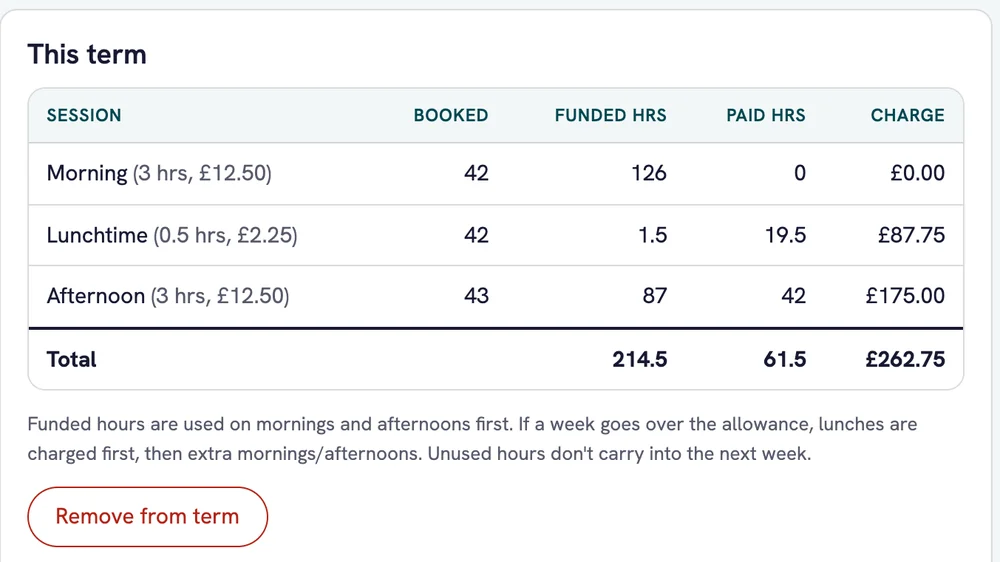
Funded hours applied week by week and shown free, with AM and PM sessions funded first and lunches charged first when a week goes over the cap. Every extra itemised, siblings on one invoice, deposits taken off automatically.
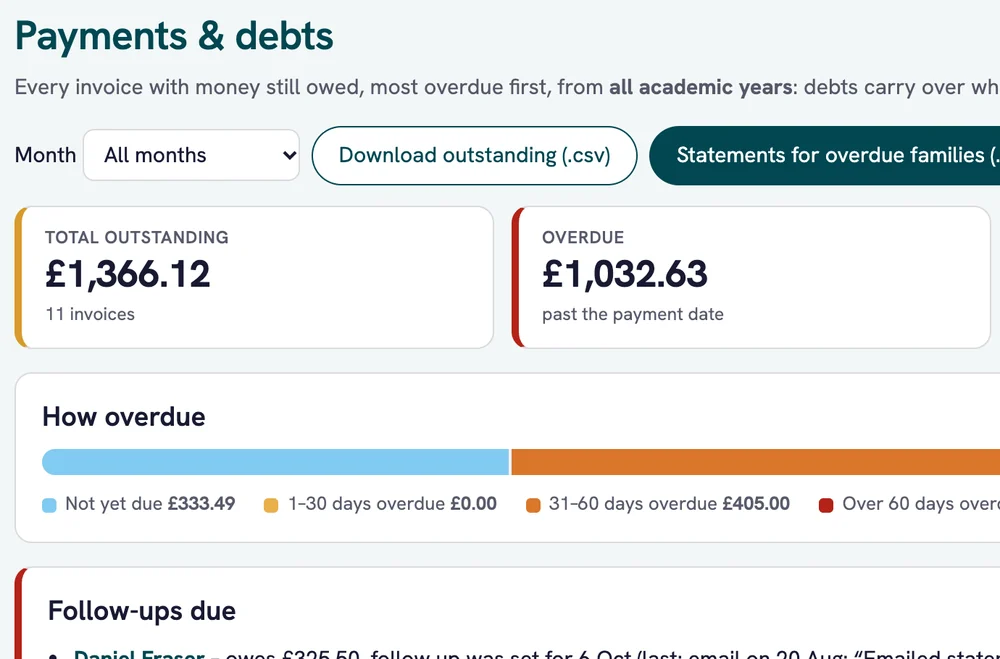
Payments and debts: £1,366.12 outstanding, £1,032.63 overdue, and a bar showing how overdue the money is.
Getting paid

Payments and debts

What’s owed and how overdue: not due, 30, 60 and 90+ days. A chase log with follow-up dates, and statements and reminders in one click.

A child’s bookings for the term: morning, lunchtime and afternoon sessions with booked, funded and paid hours and the charge for each.
Bookings

Bookings and places

Usual weeks, extra sessions and mid-term changes, with the places left in each session and your waiting list.

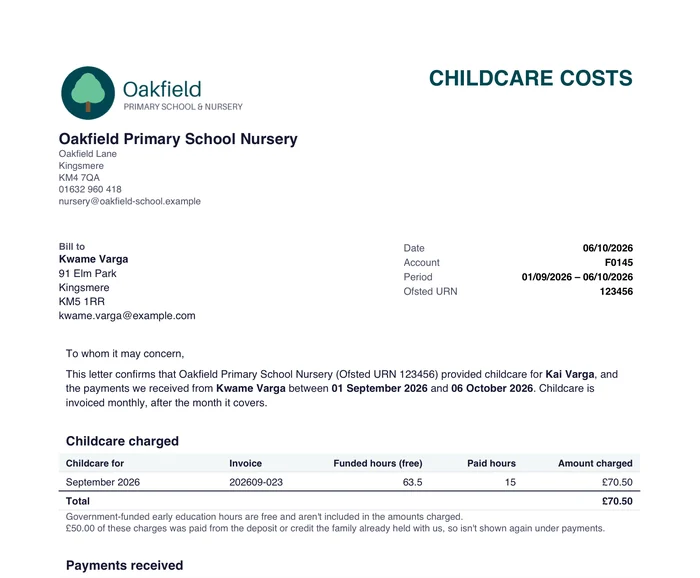
A childcare costs letter for a family, showing childcare charged and payments received.
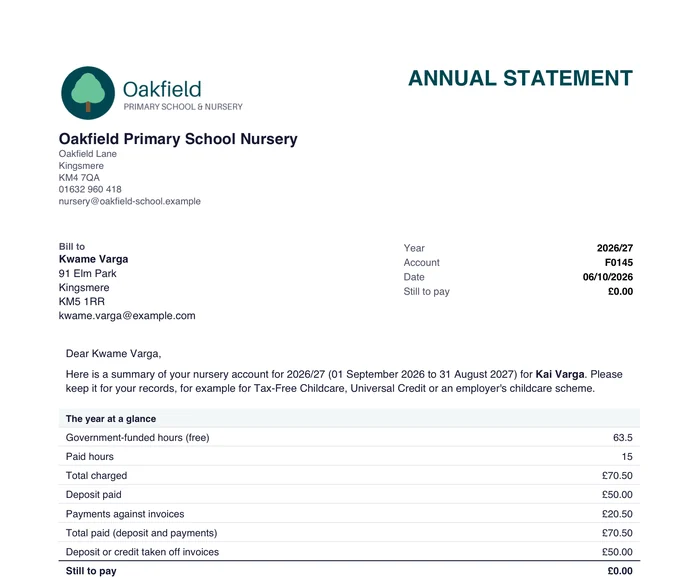
An annual statement for a family, with the year at a glance and month-by-month totals.
Letters

Letters for families

Proof of childcare costs for Universal Credit and Tax-Free Childcare, annual statements and deposit receipts.

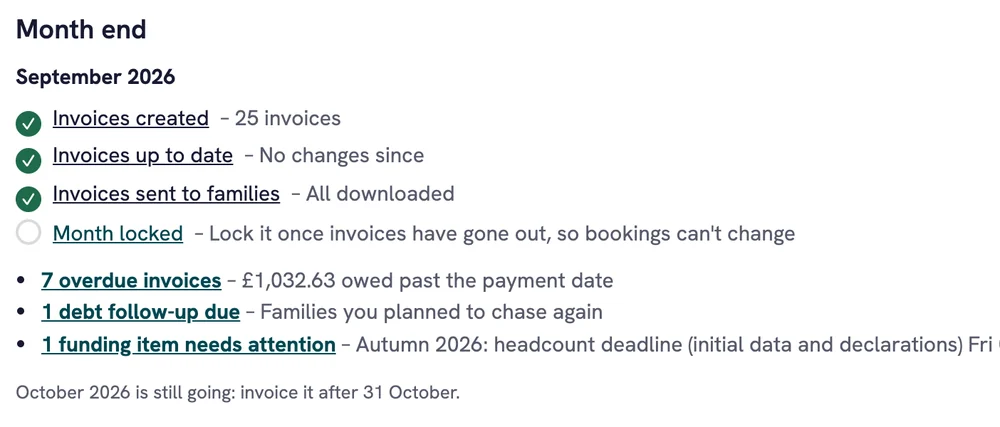
Month-end checklist for September 2026: invoices created, up to date and sent to families, with the month still to lock.
Month end

Month-end checklist

Invoices created, up to date, sent and locked, all at a glance, so nothing gets missed at the busiest time of the month.

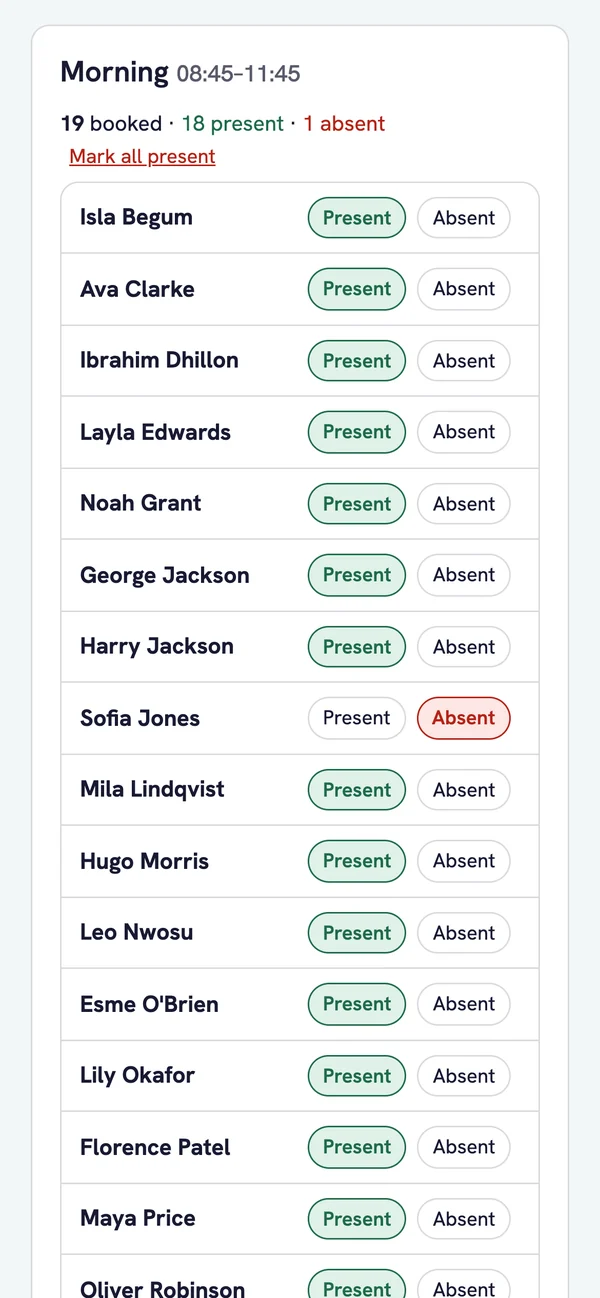
The optional daily register on a phone: this morning’s session with present and absent marks.
Register

Optional daily register

Mark today’s sessions present or absent on a phone or tablet, if attendance isn’t already in your school system.

Every funded hour claimed. Every penny checked.

Your early years funding claim, worked out from the bookings you already have, and checked against what the council actually pays.

  • Claim sheet for the portal. Everything you need to enter your termly claim on your local authority’s portal.
  • Next term’s estimates worked out from the bookings you already have.
  • 30-hours codes checked, with grace periods worked out for you.
  • Council payments checked child by child. Upload the statement and see anyone paid less.
  • Audit readiness score for every term, so you know what to fix first.
  • One-click audit pack of claims, declarations, codes, invoices and payments.

Nursery Billing helps you get ready for a funding audit. It produces the claim sheet; your staff enter it on the local authority’s portal.

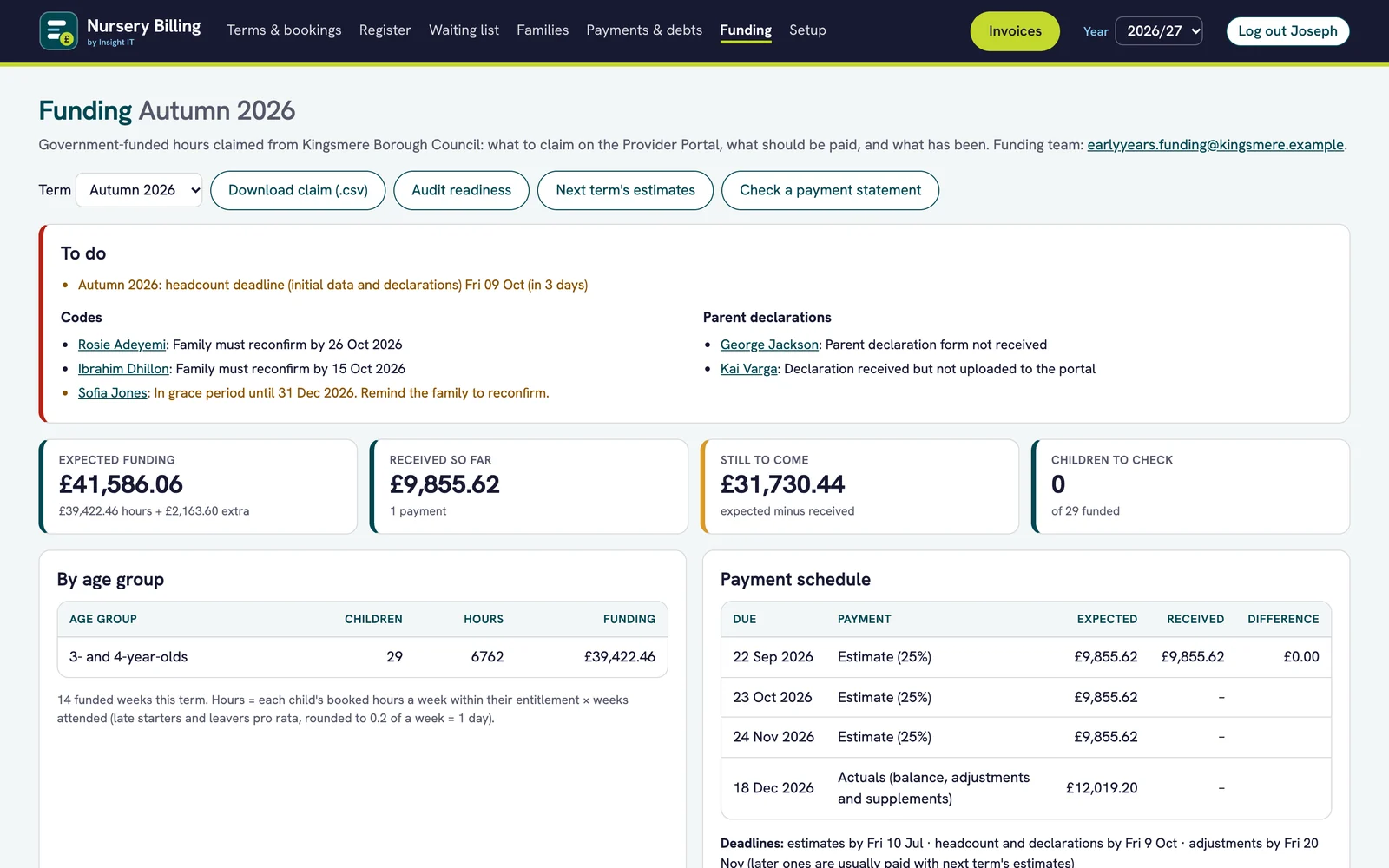
Funding page with a to-do list, funding expected against received so far, and the council’s payment schedule.
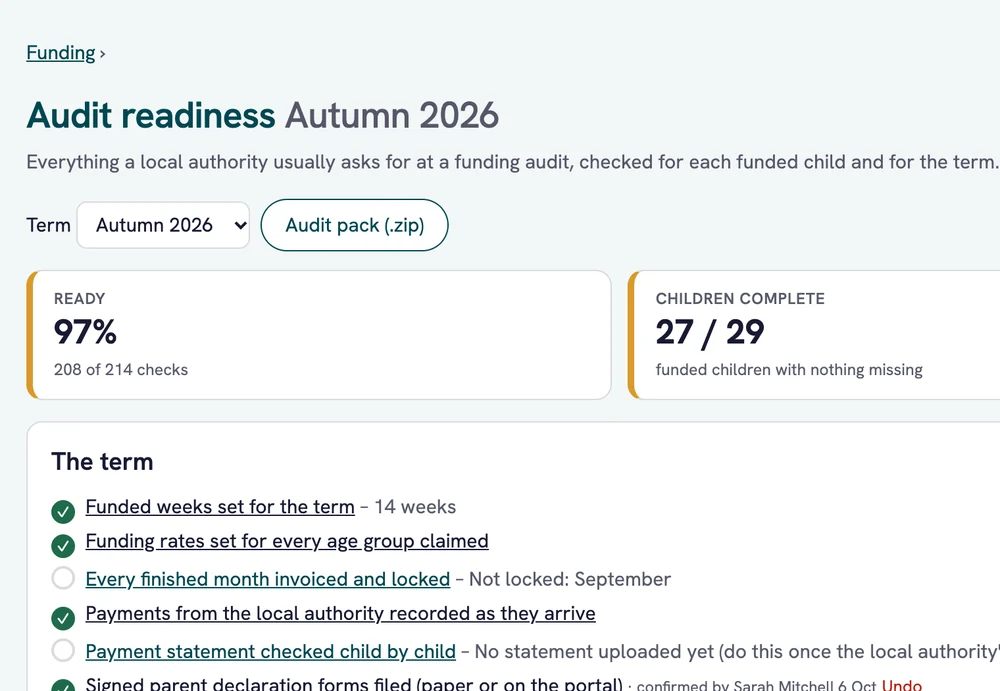
Audit readiness for the autumn term: 97% ready, 27 of 29 children complete, with the term checklist.
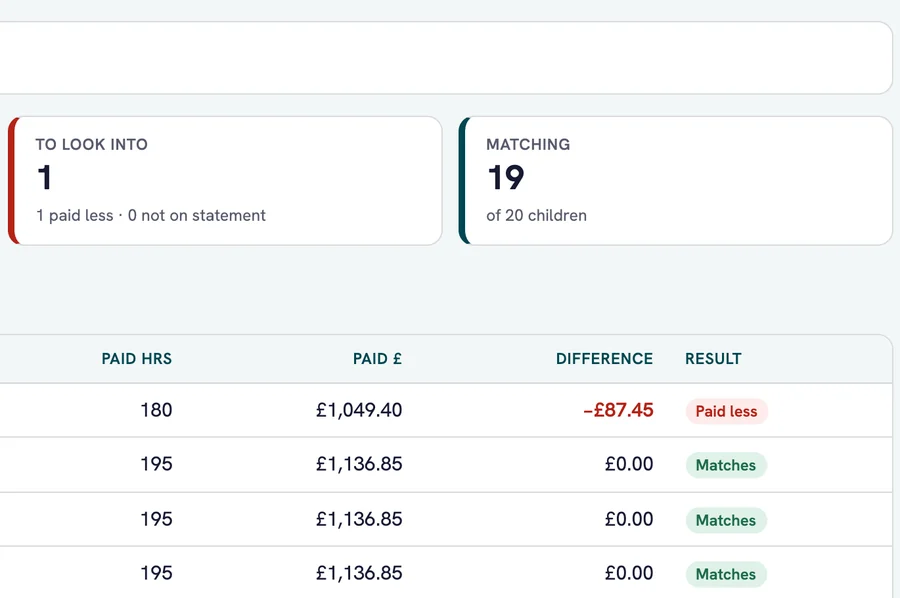
Council payment statement checked child by child: 19 of 20 children match and one child is flagged as paid less.

Safe with children’s data

Built by a schools IT company, with the safeguards your data protection officer will ask about.

UK data centre

Hosted in London, with your data kept in the UK.

Microsoft 365 sign-in

Staff sign in with their school Microsoft 365 account.

Nightly encrypted backups

Backed up every night and stored separately, also in the UK.

Paperwork done for you

A data processing agreement and a DPIA template are included.

One price. Everything included.

No per-child charges and no modules to add on. One plan for your school nursery, with set-up, training and support from our own team.

Part of a trust or a group of schools? Ask us about discounts.

Nursery Billing
£595/year per school

Everything included. No per-child charges.

£300 one-off set-up: we import your families, connect Microsoft 365 sign-in, set up your local authority’s rates and dates, and train your team.

  • Billing and itemised invoices
  • Payments, debts and chasing
  • Letters and statements
  • Funding claims, estimates and payment checks
  • Audit readiness and audit pack
  • Optional daily register
  • UK hosting, nightly encrypted backups and updates
  • Support by phone and email
Book a demo

Billed annually. Prices exclude VAT. Discounts for trusts and groups of schools.

Why Insight IT

We look after IT for schools across Bedfordshire, Luton and Milton Keynes. We built Nursery Billing with a school office, for the way school nurseries actually work, and we support it ourselves.

Our IT services for schools

Built with a school office

Nursery Billing was designed alongside a primary school’s office team, around the jobs they actually do every month and every term.

Common questions

Can’t see your question? Call us on 01234 400190.

Does it work with our local authority?

Yes. Rates, terms, deadlines and payment dates are settings, so we set them up for your authority. The claim sheet works with any portal, including Synergy, Capita One and Liquidlogic EYES: your staff enter the claim using the sheet it produces.

Does it produce invoices the way the DfE expects?

Yes. Invoices are itemised, with funded hours shown as free, in line with DfE guidance since January 2026.

Can parents pay online?

Payments are recorded in Nursery Billing, and parents pay the school the way they do now, such as bank transfer or Tax-Free Childcare. Invoices are PDFs that you send to families.

We take attendance in Arbor. Do we need the register?

No. The daily register is optional and switched off by default.

How long does set-up take?

Usually a day. We import your families, connect Microsoft 365 sign-in, set up your local authority’s rates and dates, and train your staff.

What about our data?

It stays in the UK, it’s backed up every night, and we sign a data processing agreement with you. We also provide a DPIA template.

Can we try it first?

Yes, on a demo site with example data, so you can see it working before you decide.

Does it guarantee we’ll pass a funding audit?

No software can promise that, but Nursery Billing helps you be ready: it scores each term’s readiness and builds an audit pack of claims, declarations, codes, invoices and payments in one click.

See it with your own nursery in mind.

Book a 20-minute demo. We’ll show you Nursery Billing using example data, and answer questions about your local authority, your sessions and your current spreadsheet.

Book a 20-minute demo

We’ll only use these details to arrange your demo. See our privacy notice.