
Every website your school uses, one tap away.

StudentHub and TeacherHub give your pupils and staff their own pages of big picture buttons, which your school changes itself. Add StudentHub MDM and your Android tablets set themselves up and stay that way.

For pupils and staff

StudentHub and TeacherHub

Your school’s own pages of big, clearly labelled picture buttons that open the websites you already use: one for children, one for staff. Pupils just open the page and tap.

  • Your own addresses: yourschool.studenthub.school and yourschool.teacherhub.school
  • Your school’s name and logo, and button pictures you choose
  • Sub-pages to group buttons, such as Maths, Phonics or Year 3
  • Nothing to log into, and fast even when thirty tablets open it at once
  • Home-screen shortcuts with the right icon on iPad and Android

On the staff hub

IT Support button. Staff fill in a short form and it goes straight to our helpdesk as a ticket, with your school already identified. No email, no login, no “which school are you from?”

SiteHub button. For schools that use our site-management ticketing system, a button straight through to it.
Included with the hubs

Change the buttons yourself

A simple portal where your school runs its own pages, without phoning anybody.

  • Staff log in to the portal with a link sent to their email
  • Add, rename, reorder and remove buttons on either hub
  • Upload a picture for each button, and swap it any time
  • Create sub-pages and manage the buttons inside them
  • Changes appear on the live page straight away
  • Several staff can have logins, and each school sees only its own pages
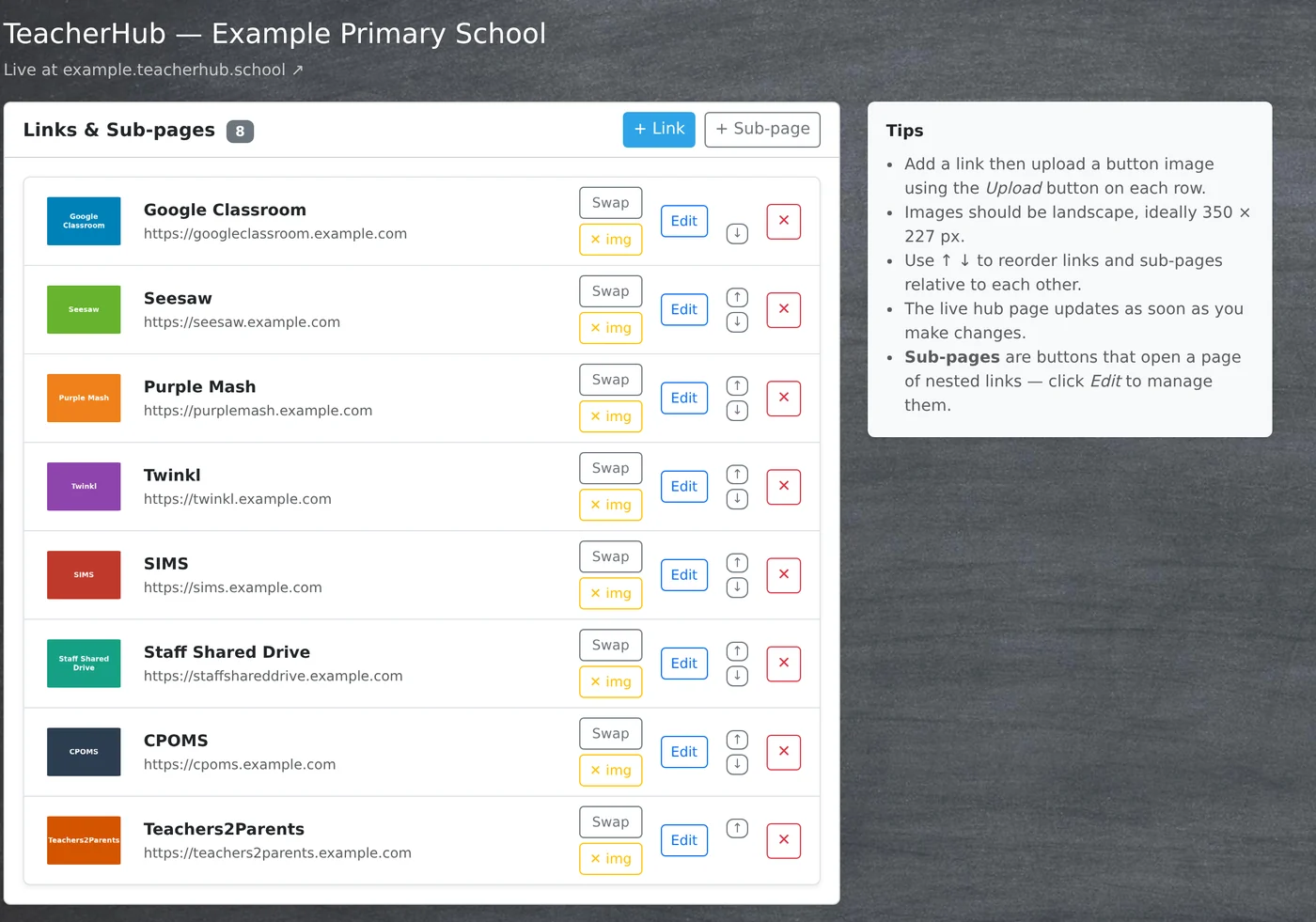
The TeacherHub editor: a list of buttons, each with its picture and web address, and buttons to swap the picture, edit, reorder or remove it.
Optional · licensed per school

StudentHub MDM

Tablet management for managed Android tablets

Set up and control your school’s managed Android tablets from the same portal, so a trolley of tablets is ready for a lesson without setting each one up by hand.

One scan to set up

Scan the QR code from the portal while setting up a factory-reset tablet, and it sets itself up with your WiFi, settings and apps.

Settings in groups that make sense

Make a set of settings for each group of tablets, such as “Year 3 trolley” or “Library tablets”. Each starts from a standard we maintain, with over a hundred settings in plain English: the home screen, which apps can open, the browser and what it can reach, brightness, volume, sleep times and WiFi.

Nothing changes until you publish

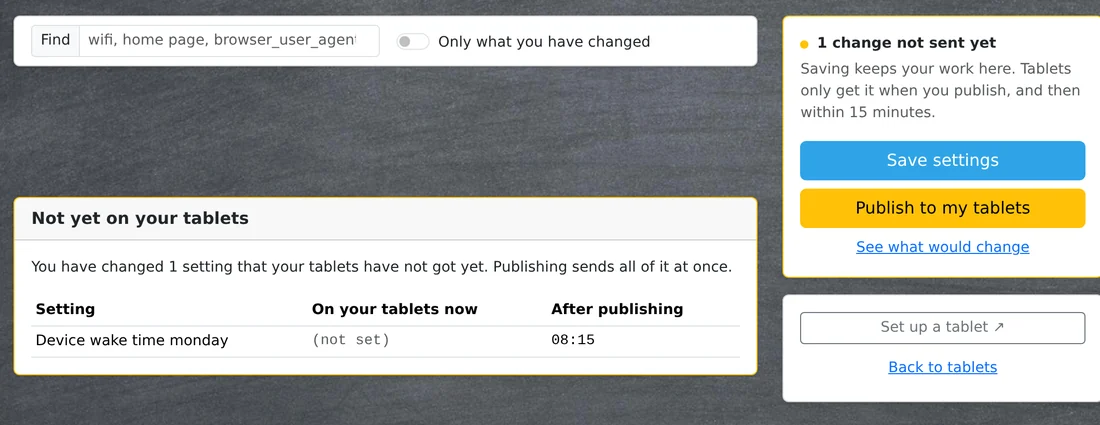
Saving isn’t sending. You see exactly what will change, side by side with what the tablets have now, and nothing reaches a tablet until someone presses publish. Published changes reach every tablet within fifteen minutes, and settings that would leave a tablet looking broken are refused.

Apps

Choose from the apps we host, or upload your school’s own. Tablets install what’s on the list at their next check-in, and an update from a different developer is refused rather than pushed to thirty tablets.

See what every tablet is doing

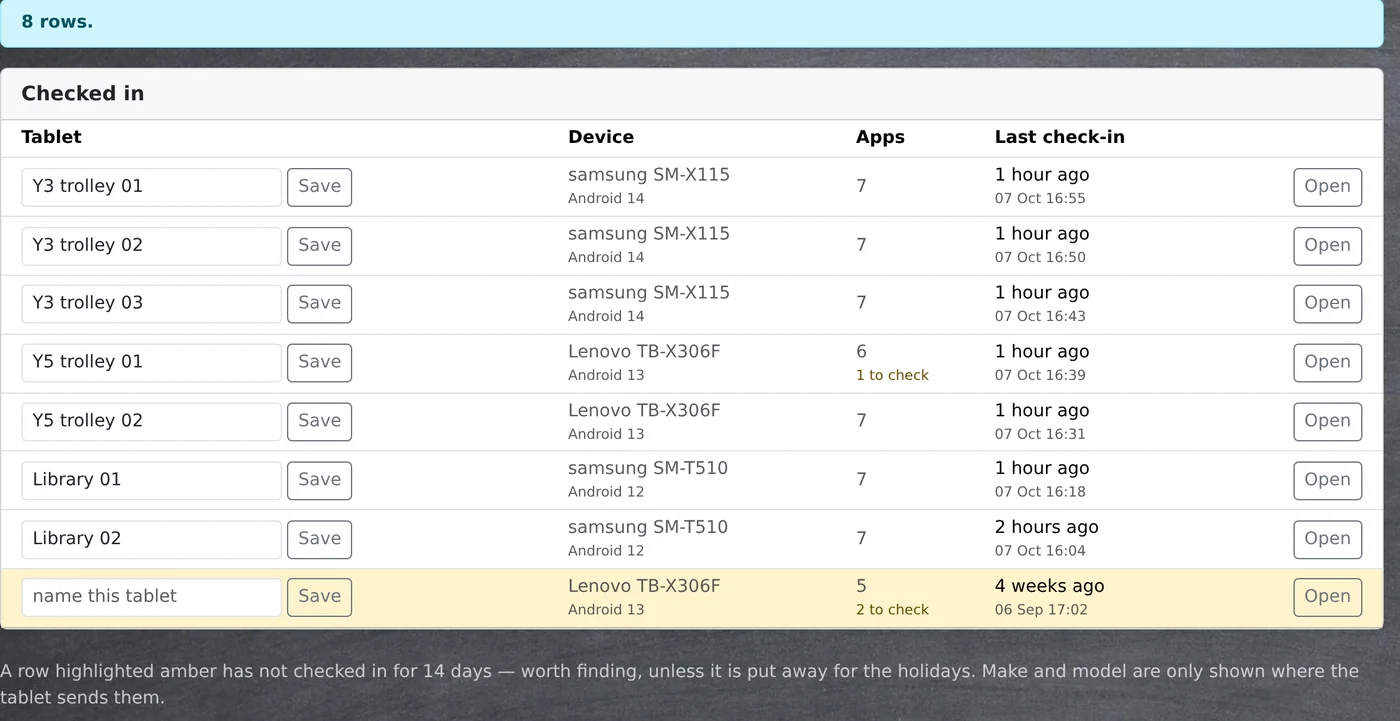
Model, Android version, battery, WiFi network and last check-in for every tablet, with a warning when one has gone quiet for a fortnight. You can see which apps are installed against which should be, so a missed install shows up before a teacher reports it.

List of the school’s tablets with their names, models, number of apps and last check-in, with one tablet highlighted because it hasn’t checked in for four weeks.
An unpublished settings change shown before and after, with buttons to save the settings or publish them to the tablets.

What your school never has to do

With StudentHub, TeacherHub and StudentHub MDM, the fiddly parts are handled for you.

  • Phone us to add a link
  • Set up each tablet by hand
  • Find out from a child that a tablet has stopped working

See StudentHub and TeacherHub for your school

Call or email and we’ll show you how the hubs and tablet management would work for your school.